


How can I sell items in Zoo 2: Animal Park?
To sell objects and items in Zoo 2: Animal Park, you can either first return them to your inventory or sell them directly.
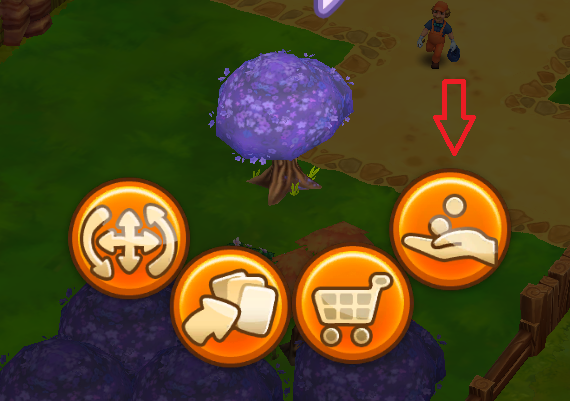
Tap on the desired object or item, then a menu will appear. Click on the inventory icon (an arrow with 3 cards) in that menu and it will be immediately sent to your storage.
In your storage simply tap on the desired object and a window will open in which you can select the number (if you have several objects of one type in your inventory) and then sell it/them.
If you want to sell an object directly, you can simply tap on it and then select the icon on the right, which shows a hand and two coins. This will open a window in which you can confirm the sale.
What are the keys for in Zoo 2: Animal Park?
You can use the keys in Zoo 2: Animal Park when you turn over cards from chests. If you have keys available, you can tap these keys in the overview when turning over cards. You can then turn over one additional card for each available key.
How can I transfer my Zoo 2: Animal Park account?
In Zoo 2: Animal Park you can create an upjers account at any time in the game settings (cogwheel at the bottom right).
You can then log into your Zoo 2: Animal Park account on a new device as follows:
First, you will land in a new account. Then simply open the game settings again and tap the option "Log in with upjers account". Here you simply enter your specified access data to get back to your old Zoo 2: Animal Park account.